As the business landscape becomes increasingly competitive, small businesses need to find ways to streamline their operations, enhance efficiency, and stay ahead of the curve. One effective solution that has gained significant popularity in recent years is the implementation of Enterprise Resource Planning (ERP) systems. In this comprehensive guide, you will learn about the benefits of ERP for small businesses, how to effectively implement it, and important considerations to take into account.
What is ERP for Small Business?
ERP stands for Enterprise Resource Planning, which refers to a software system that helps businesses manage and integrate various aspects of their operations, such as finance, human resources, inventory, sales, and more. While ERP systems have traditionally been associated with large corporations, they can also provide immense value to small businesses.
ERP for small business streamlines processes, eliminates manual tasks, improves data accuracy, enables better decision-making, and increases overall productivity. By consolidating and automating various aspects of your business operations in a single system, ERP can help you optimize resources, reduce costs, and drive sustainable growth.
The Benefits of ERP for Small Businesses
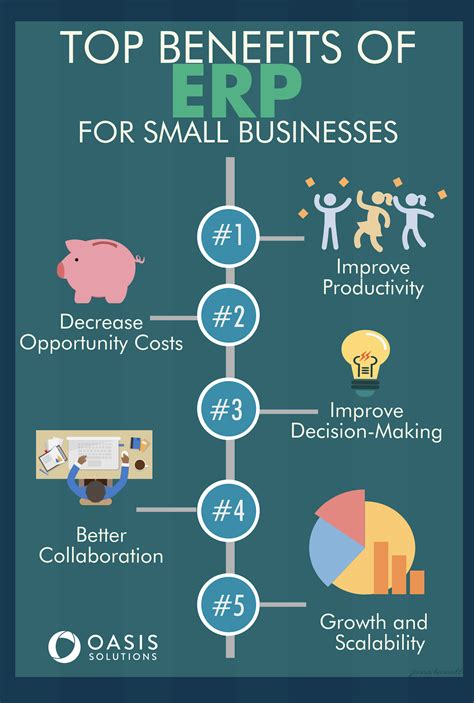
Implementing an ERP system can bring numerous advantages to small businesses. Here are some key benefits:
1. Improved Efficiency and Productivity
By automating repetitive tasks and integrating multiple functions, ERP can significantly improve efficiency and productivity. Instead of spending precious time on manual processes, employees can focus on more value-added tasks, leading to enhanced productivity levels within the organization.
2. Streamlined Operations
ERP allows you to streamline your business operations by centralizing data and processes. This eliminates the need for multiple software systems and reduces the chances of errors and inconsistencies. With all your data in one place, you can easily access vital information, track inventory, manage orders, and streamline financial operations.
3. Enhanced Data Accuracy and Reporting
ERP systems provide real-time data updates and accurate reporting, allowing you to make informed business decisions. With a single source of data, you can ensure data integrity, avoid duplication, and gain deeper insights into critical metrics. This enables you to identify trends, detect issues, and make data-driven decisions that propel your business forward.
4. Improved Customer Satisfaction
ERP systems enable better customer relationship management by providing a holistic view of customer information, interactions, and transactions. With this integrated data, you can deliver personalized experiences, improve responsiveness, and enhance overall customer satisfaction.
5. Scalability and Growth
As your small business grows, ERP can easily scale to accommodate your evolving needs. The modular nature of ERP systems allows you to add or remove functionalities based on your requirements. This scalability ensures that your ERP system grows with your business, providing support and flexibility throughout your journey.
Implementing ERP for Small Businesses
While implementing an ERP system may seem daunting, following a structured approach can simplify the process. Here are the key steps to effectively implement ERP for small businesses:
1. Understand Your Business Requirements
Begin by conducting a thorough analysis of your business processes and requirements. Identify the pain points, bottlenecks, and areas that can benefit from automation. This will help you select an ERP system that best aligns with your needs.
2. Research and Select the Right ERP System
Research various ERP vendors and systems available in the market, considering factors such as functionality, scalability, cost, support, and user-friendliness. Evaluate demos and consult experts to ensure you choose an ERP system that meets your business needs.
3. Plan the Implementation Process
Create a detailed implementation plan, including key milestones, timelines, and resource allocation. Define clear project goals, roles, and responsibilities to ensure a smooth implementation process. Consider seeking the assistance of a consulting firm specializing in ERP implementation.
4. Data Migration and Integration
One of the critical aspects of ERP implementation is migrating existing data into the new system. Ensure data accuracy, consistency, and compatibility during the migration process. Integrate the ERP system with other existing systems to enable seamless data flow
5. Training and Change Management
Train your employees on how to effectively use the new ERP system. Organize workshops, provide comprehensive training materials, and establish a support system to address any queries or challenges during the transition. Effective change management plays a crucial role in successful ERP implementation.
6. Test and Monitor
Thoroughly test the ERP system and its integrations to ensure functionality and data integrity. Monitor the system closely during the initial stages to detect any issues and make necessary adjustments. Regular maintenance and updates are also essential to optimize system performance.
7. Continuous Improvement
ERP implementation is not a one-time process. Continuously evaluate and improve your ERP system to meet changing business needs. Solicit feedback from users, monitor key performance metrics, and make necessary adjustments to maximize the benefits of your ERP system.
Considerations for ERP Implementation
Before embarking on an ERP implementation journey, it is essential to consider the following factors:
1. Budget and Costs
Create a detailed budget that includes ERP system costs, implementation expenses, training, maintenance, and ongoing support. Factor in both upfront and long-term costs to ensure financial feasibility.
2. Customization vs. Standardization
Decide whether your business requires extensive customization or can adapt to standard ERP processes. While customization offers flexibility, it can increase complexity and costs. Striking the right balance between customization and standardization is crucial.
3. Data Security and Privacy
Ensure your chosen ERP system provides robust data security measures to protect sensitive business information. Implement access controls, data encryption, and other security protocols to safeguard your data from unauthorized access or breaches.
4. Scalability and Integrations
Consider your future business growth and ensure the ERP system can seamlessly integrate with other software applications you may use. Scalability is vital to accommodate expanding operations and evolving business needs.
5. Staffing and Training
Identify the resources required for successful ERP implementation. Ensure you have a dedicated team to oversee the process, and provide comprehensive training to employees to maximize system utilization and benefits.
Frequently Asked Questions about ERP for Small Businesses
Q: Can small businesses benefit from ERP systems?
A: Absolutely! ERP systems offer numerous benefits to small businesses, including improved efficiency, streamlined operations, enhanced data accuracy, and better decision-making capabilities. Scaled-down versions and cloud-based ERP solutions cater specifically to the needs and budgets of small businesses.
Q: Is ERP implementation cost-effective for small businesses?
A: While ERP implementation costs upfront investment, it proves to be cost-effective in the long run. By eliminating manual processes, reducing errors, and optimizing resource allocation, ERP systems enhance productivity and save costs in various areas, such as inventory management, order processing, and financial operations.
Q: How long does it take to implement an ERP system for a small business?
A: The implementation timeline varies depending on the complexity of your business processes, the chosen ERP system, and the level of customization required. On average, ERP implementation for small businesses can range from a few months to a year. A well-planned implementation strategy can ensure a smoother and faster process.
Conclusion
Implementing an ERP system for your small business can revolutionize the way you operate, improve efficiency, and drive sustainable growth. By streamlining processes, optimizing resources, and providing real-time insights, ERP systems empower small businesses to compete effectively in today’s dynamic business landscape. Careful planning, thorough research, and effective implementation strategies are essential to maximize the benefits of ERP for small businesses. Embrace the power of ERP and propel your small business to new heights of success!